
Table of Contents
ToggleFinding the right typography for a project can take forever. I recently came across these 20 After Effects title templates while looking for some inspiration, and they’re honestly a game-changer for anyone trying to speed up their editing workflow.
What I really like about these After Effects title templates is how versatile they are. Whether you’re working on a minimalist corporate video or a high-energy YouTube intro, there’s something in this pack for everyone.
20 Unique Designs: From clean lower thirds to bold cinematic titles.
Full Control: You can easily change fonts, colors, and duration without breaking the animation.
No Extra Plugins: You don’t need to buy anything else to make these work; just open After Effects and start editing.
Since these are pre-made After Effects title templates, you literally just have to drag them into your timeline and swap the text. It’s probably the easiest way to give your production value a massive boost without the headache of manual keyframing.
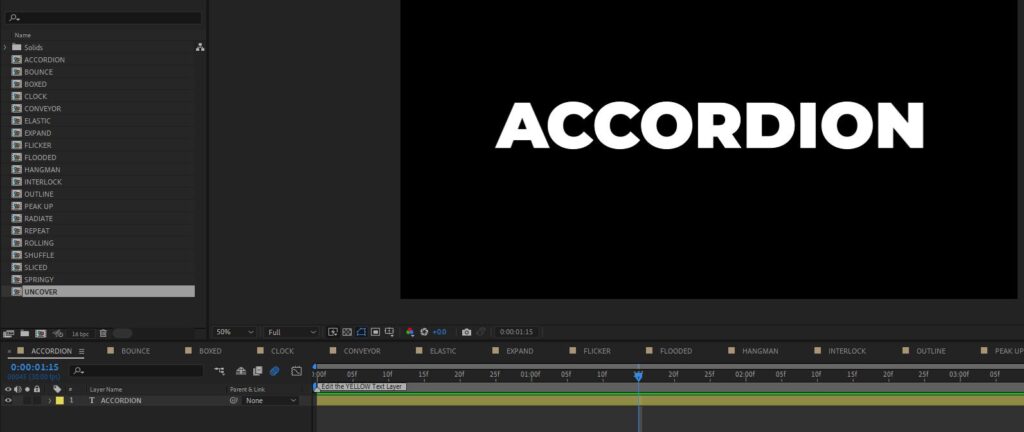
To give you a better idea of what’s included, here is the full list of the 20 After Effects title templates you’ll find in this pack. Each one has a unique movement style to fit different project vibes:
Dynamic & Energetic: Bounce, Elastic, Springy, and Radiate.
Modern & Clean: Outline, Boxed, Expand, and Sliced.
Creative Transitions: Accordion, Conveyor, Rolling, and Uncover.
Unique Text Effects: Flicker, Hangman, Shuffle, and Clock.
Bold & Catchy: Peak Up, Flooded, Repeat, and Interlock.
Everything is organized and ready to go—just pick the style that matches your video’s energy.
Preview of the 20 essential After Effects title templates available for download.
Scroll down to start the countdown for your download.
Getting these titles into your project is super simple. Since they are pre-made presets, you don’t need to deal with complicated project files. Here’s the quickest way to get started:
Step 1: Install the files Copy the downloaded template files and paste them into your After Effects “User Presets” folder. Usually, you can find it here:
Windows: Documents\Adobe\After Effects (Version)\User Presets
Mac: Documents/Adobe/After Effects (Version)/User Presets
Step 2: Locate the titles in AE Open After Effects and go to the Effects & Presets panel (if you don’t see it, go to Window > Effects & Presets). You should see your new templates under the “User Presets” folder.
Step 3: Drag and Drop Select the text layer in your timeline that you want to animate, then simply drag your chosen title template from the panel and drop it directly onto the layer.
Step 4: Customize Head over to the Effect Controls panel to tweak the colors, timing, or fonts to match your video’s vibe.
Can I use these for commercial projects? Yes! These templates are copyright-free and cleared for broadcast, motion pictures, and online commercial use. This includes monetized YouTube videos, so you’re all set for professional gigs.
What are the requirements for using them? The only thing we ask is that you give credit to Enchanted Media in your project or description. Also, please do not host these files on other servers or websites; always link back to the original source.
Do I need any third-party plugins? Nope. These were built using standard After Effects tools, so they’ll work perfectly without any extra paid plugins.
Are they easy to customize? Absolutely. You can swap fonts, adjust colors, and change the timing directly within After Effects to fit your specific needs.
Conclusion: These 20 titles are a solid addition to any editor's toolkit. They're fast, clean, and completely free to help you streamline your workflow.
If you're looking for even more variety, don't forget to explore our main library with over 500+ free After Effects title templates to find the perfect match for any project style.
Source: Enchanted Studios
Tags: Free AE Titles