Stop Paying! Get 300+ FREE Drag-and-Drop Transitions & Effects for Premiere Pro
Table of Contents
ToggleAre you a video editor or filmmaker just starting out? Are you tired of spending money on expensive assets like transitions, overlays, and color effects?
If you answered yes, we have the ultimate resource for you! We recently discovered a game-changing YouTube tutorial from AKV Studios that shows you exactly how to download over 300 professional, high-quality Transitions and Effectsβall completely free. These assets are perfect for Adobe Premiere Pro (and work with other video editing software, too!).
This is not clickbait. Here is the breakdown on how to get your hands on this massive, free pack and instantly level up your video production quality.
π What You Get: Over 300+ FREE Transitions, Effects & Overlays
Based on the official download folders from AKV Studios' "Shop Free Downloads" section, here is the detailed breakdown of the massive free resource package you will receive. This collection is essential for speeding up your video editing workflow in Premiere Pro.
Preview of Downloaded Premiere Pro Plugins & Presets
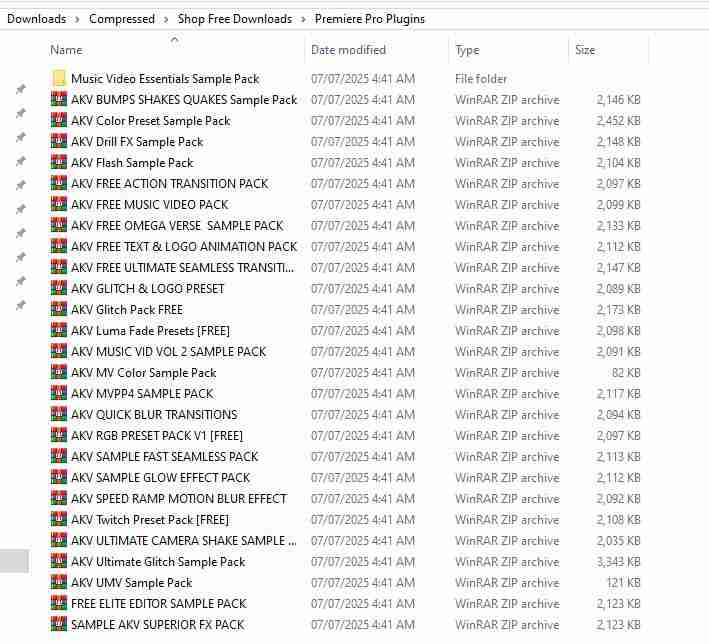
Category 1: Core Transitions & Premiere Pro Presets
These packs primarily contain customizable presets (.prfpset) and specialized effects designed for direct use within Premiere Proβs Effects Panel.
| Pack Name | Estimated Content Type |
|---|---|
| AKV FREE ULTIMATE SEAMLESS TRANSITI... | **Seamless Transitions** (Quick and smooth cuts). |
| AKV BUMPS SHAKES QUAKES Sample Pack | **Camera Shake/Quake Effects** for dynamic action scenes. |
| AKV GLITCH Pack FREE / AKV ULTIMATE GLITCH Sample Pack | Variety of **Glitch and Distortion** visual effects. |
| AKV Color Preset Sample Pack / AKV RGB PRESET PACK V1 [FREE] | **Color Grading Presets** and RGB Split effects. |
| AKV FREE TEXT & LOGO ANIMATION PACK | Animated templates for **Text and Logo reveals**. |
| AKV QUICK BLUR TRANSITIONS / AKV Flash Sample Pack | **Blur, Flash, and Luma Fade** transition effects. |
| AKV SPEED RAMP MOTION BLUR EFFECT | Presets for adding **Motion Blur** to speed ramped footage. |
| FREE ELITE EDITOR SAMPLE PACK / SAMPLE AKV SUPERIOR FX PACK | Various high-level **Special Effects (FX)** samples. |
Preview of Downloaded Motion Graphics & Overlays
Category 2: Cinematic Overlays & Motion Graphics
These assets are mainly drag-and-drop video files (overlays) used to add realistic texture, style, and unique transitions to your footage using Blend Modes.
| Pack Name | Estimated Content Type |
|---|---|
| AKV 8 MM SAMPLE PACK / AKV 16MM SAMPLE PACK | **Vintage Film Looks** (Grain, Dust, Light Leaks) from 8mm and 16mm film stock. |
| FREE SAMPLE VINTAGE FILM PACK | Additional collection of **Classic/Vintage Film** textures. |
| @akvstudios - paper rip transition | **Paper Rip Transitions** (often used with Blend Modes or Keying). |
| AKV Green Screen Paper Transitions | Paper transitions using a **Green Screen** background for easy keying. |
| AKV FREE IG FRAMES PACK | **Instagram Frames** for adapting videos to social media aspect ratios. |
| Music Video Essentials Sample Pack / AKV Music Video Assets | Various **assets and graphics** specifically useful for music videos. |
With this free collection, you now have a comprehensive toolkit covering everything from cinematic textures to high-speed transitions, significantly enhancing your video editing capabilities without spending a dime!
π¬ Watch the Full Tutorial Here
Before diving into the download steps, we highly recommend watching the original tutorial by AKV Studios. It confirms the authenticity of the free offer and clearly demonstrates how to use the different asset types, including overlays and presets.
π Step-by-Step Guide: How to Unlock and Download the 300+ Free Assets
The creator has placed the direct download link behind a simple social action wall (as shown in the image above). This is the creator’s way of gaining support for providing these extensive assets for free. The entire process takes less than one minute.
**Important Note:** We strongly encourage you to download the files through the link provided below. This is the official mechanism the creator uses to gain support for their free work. We have included the direct link here for convenience.
Follow these steps to unlock the download link:
- **Click the Unlock Link:** Use the official access link provided by the creator:
https://rekonise.com/free-video-transition-and-effect-resources-l1z9w
- **Complete Social Actions:** A pop-up window (similar to the image) will appear, requiring you to complete two quick actions to unlock the content:
- Click the **”Subscribe to channel”** button.
- Click the **”Follow user”** button (usually on Instagram).
- **Unlock and Download:** Once both steps show **”unlock progress 2/2,”** the **”Unlock link”** button will become active. Click it to be redirected to the download folder containing all the free preset and overlay packs.
- **Save Files:** Download the ZIP/RAR archives to your computer. Remember to extract the files before installation.
π¬ Integrating the Free Assets into Premiere Pro: The Drag-and-Drop Method
One of the biggest advantages of this free collection is its efficiency: most assets are designed for instant **drag-and-drop** application. However, you need to understand the difference between using **Overlays** and **Presets** for correct implementation.
1. How to Use Cinematic Overlays (Film Grain, Light Leaks, Paper Rip)
Overlays are video files (typically .MOV or .MP4) that you place on an upper video track to add texture, light leaks, or specific visual effects. This includes packs like AKV 8MM/16MM SAMPLE PACKS.
- **Placement:** Drag the overlay file (e.g., a film grain texture) onto a video track **above** your main footage (V2 or higher).
- **Select & Locate:** Select the overlay clip in your timeline, then open the **Effect Controls** panel.
- **Adjust Blend Mode:** Find the **Opacity** section, and change the **Blend Mode** (Blending Options) from **Normal** to a blending option that allows the effect to interact with your footage.
- **Recommended Modes:** Try **Overlay**, **Screen**, or **Lighten**. (The video demonstrates this at **[02:45]**).
- **Result:** Your footage will instantly take on the cinematic texture provided by the overlay!
2. Installing and Applying Presets (Transitions, Glitch, Shake Effects)
Presets are .prfpset files (e.g., AKV FREE ULTIMATE SEAMLESS TRANSITI...) that contain pre-configured effects and must be imported into Premiere Pro before they can be used.
A. Installation (One-Time Setup):
- **Locate Presets Panel:** In Premiere Pro, open the **Effects** panel.
- **Import:** Find the **Presets** folder, right-click on it, and select **"Import Presets..."** (as shown at **[03:25]**).
- **Select File:** Navigate to the unzipped preset file you downloaded (the .prfpset files) and click **Open**. The new preset folder will now appear under your "Presets" list.
B. Applying Seamless Transitions:
The included transitions (like Twitch, Pan, Blur) often require a quick **Nested Sequence** for proper application:
- **Prepare the Cut:** Find the exact cut point between your two clips.
- **Create a Nest:** Select both clips around the cut point (e.g., 5 frames before and 5 frames after). Right-click and choose **"Nest..."** (or **"Nest Sequence"**) (**[04:20]**).
- **Apply Transition:** Locate your imported transition preset (e.g., *Pan Down Transition*) in the Effects Panel and drag it directly onto the newly created **Nested Sequence**.
β Frequently Asked Questions (FAQs)
Do these 300+ transitions and effects truly cost nothing?
Are these free Premiere Pro assets compatible with the latest CC versions (2023, 2024)?
Do I need to be an experienced editor to use these drag-and-drop presets?
What is the best way to support the creator (AKV Studios)?
β Conclusion: Level Up Your Edits Today!
The ability to access **300+ free, high-quality transitions and effects** is a massive advantage for any video editor, whether you are a beginner or a seasoned professional. Follow the steps provided, download the packs, and start integrating these professional assets into your projects right away. You will see a significant boost in both the **quality** and **speed** of your video editing workflow.
Don't Stop Here: Explore 5000+ More Free Transitions!
While the AKV Studios pack is incredible, if you are hungry for more free assets to build your ultimate editing library, be sure to check out our extensive, curated collection. We offer thousands of additional, high-quality transitions and effects that you can download today:
π Click Here to Download 5000+ FREE Premiere Pro Transitions!
If you found this guide helpful, please share this post with other editors!
